Showing posts with label google tips. Show all posts

Sunday, May 1, 2022

How to download view only Pdf file from google drive without permission

let jspdf = document.createElement( "script" );

jspdf.onload = function () {

let pdf = new jsPDF();

let elements = document.getElementsByTagName( "img" );

for ( let i in elements) {

let img = elements[i];

if (!/^blob:/.test(img.src)) {

continue ;

}

let canvasElement = document.createElement( 'canvas' );

let con = canvasElement.getContext( "2d" );

canvasElement.width = img.width;

canvasElement.height = img.height;

con.drawImage(img, 0, 0,img.width, img.height);

let imgData = canvasElement.toDataURL( "image/jpeg" , 1.0);

pdf.addImage(imgData, 'JPEG' , 0, 0);

pdf.addPage();

}

pdf.save( "download.pdf" );

};

jspdf.src = 'https://cdnjs.cloudflare.com/ajax/libs/jspdf/1.3.2/jspdf.min.js' ;

document.body.appendChild(jspdf);

Sometimes you may have faced a situation like your friends or teachers has given you pdf, google docs, google sheets or video files with google drive links and when you open it you can preview the content of those files but when you try to download you will not get any download, copy, or print button because google has intentionally created those files with no download or print feature. In general, these types of files are view-only or protected google drive files. Suppose you like download those files and save them locally then without a hack you cannot achieve. Don't worry guys I will help you. In this article, I will be explaining to you how to download protected view-only files from google drive.

Warning: For educational purposes only.

Check the file is view only or protected by google drive files?

You can easily check whether files are view-only files for this just preview the file and hover your mouse cursor then at the top you will find no download button and print features are disabled as shown below.

check-pdf-downloadable

Also, click on the 3 dots located at the top right corner. Then click on Details

check-file-can-be-download-google-drive-1

 Steps to Download protected/view-only pdf files from google drive?

1. Open or Preview Any view-only or protected files from google drive.

2. Open Developer Console.

   If you are previewing in Google Chrome or Firefox

     Press Shift Ctrl J ( on Windows / Linux) or Option ⌘  (on Mac)

   If you are previewing in Microsoft Edge 

     Press Shift Ctrl + I 

   If you are previewing in Apple Safari

     Press Option ⌘ C

Then you will find yourself inside the developer tools.

3  Navigate to the "Console" tab.

4  Paste below code and press Enter

let jspdf = document.createElement( "script" );
jspdf.onload = function () {
let pdf = new jsPDF();
let elements = document.getElementsByTagName( "img" );
for ( let i in elements) {
let img = elements[i];
if (!/^blob:/.test(img.src)) {
continue ;
}
let canvasElement = document.createElement( 'canvas' );
let con = canvasElement.getContext( "2d" );
canvasElement.width = img.width;
canvasElement.height = img.height;
con.drawImage(img, 0, 0,img.width, img.height);
let imgData = canvasElement.toDataURL( "image/jpeg" , 1.0);
pdf.addImage(imgData, 'JPEG' , 0, 0);
pdf.addPage();
}
pdf.save( "download.pdf" );
};
jspdf.src = 'https://cdnjs.cloudflare.com/ajax/libs/jspdf/1.3.2/jspdf.min.js' ;
document.body.appendChild(jspdf);
as shown below:

paste-jspdf-script

5. Now, the pdf file start to downloads.

Note that it may take a long time for downloading if the size of the pdf is large because each page in the pdf is generated in the form of an image. Also, it doesn't guarantee the content quality of pdf remains the same.

So, if you want a high-quality pdf then try zooming out the pdf and then apply from steps 2 and below.

Technical Concept:

On-page load each Image tag on the page is search, and 
 
if the image is not found then continue finding the Image tag on the next page of the pdf.
 
Else if found: then with the help of Canvas those images are created with the drawImage() function and here we are creating images in JPEG format and later these images are added back to pdf instance by addImage() function. After that, with the help of addPage() new page is created and the same repeats until reaching the end of the page and finally pdf is downloaded.
 
And this is all possible by the use of the jsPDF library which is provided by Cloudflare. Actually, this jsPDF library is Javascript open-source library for generating PDF files.
 

 Steps to Download protected/view-only video files from google drive?

 You can even download protected/view-only video files share with you by someone else. Here are the steps:
 
1 Preview the video you want to download
 
2  Play the video.
 
3 Then Press Ctrl + Shift + C keyboard combination.
 
4 Then hover over the image and click on it.
 
5 Then you will navigate to the 'Elements' tab in the developer console.
 
6  Click inside the content of src tag and then in dropdown select "Open in a new tab"
Now you will get navigate to new windows with video.
 
7 Click on 3 dots present in the lower right corner and click on "Download"
Now the video starts to download.
 

Steps to Download protected/view-only google docs files from google drive?

You can easily download protected/view-only google docs files from google drive easily with below steps:
 
Method 1: Converting into Mobile View Mode
 
1 Open Protected/view-only google docs.
 
2 Look at the Url of google docs you will find '/edit' in the URL. Just replace it will '/mobilebasic' and press Enter.
 
Eg:
 
From 
https://docs.google.com/document/d/1FF_J3nY5WaA_4KxyDbGAmwvjSEq_dBWw3ehfva3k9S8/edit
 
To
 
https://docs.google.com/document/d/1FF_J3nY5WaA_4KxyDbGAmwvjSEq_dBWw3ehfva3k9S8/mobilebasic
 
3 Press CTRL S from keyboard combination and replace extension from .html to .doc and click on "Save" button.
 
4 Hurry google docs file is downloaded to your laptop/computer.

https://ourtechroom.com/tech/download-protected-view-only-files-google-drive/


// Example 2:

 let jspdf = document.createElement("script");


jspdf.onload = function () {

let pdf = new jsPDF('p', 'mm', [1000, 625]);
let elements = document.getElementsByTagName("img");
for (let i in elements) {
let img = elements[i];
console.log("add img ", img);
if (!/^blob:/.test(img.src)) {
console.log("invalid src");
continue;
}
let can = document.createElement('canvas');
let con = can.getContext("2d");
can.width = img.width;
can.height = img.height;
con.drawImage(img, 0, 0);
let imgData = can.toDataURL("image/jpeg", 1.0);
pdf.addImage(imgData, 'JPEG', 0, 0);
pdf.addPage();
}

pdf.save("download.pdf");
};

jspdf.src = 'https://cdnjs.cloudflare.com/ajax/libs/jspdf/1.5.3/jspdf.debug.js';
document.body.appendChild(jspdf);

https://www.gbskills.info/2021/05/how-to-download-view-only-pdf-file-from.html?m=1

Friday, January 17, 2020

How To Get an Item Count in Google Sheets

https://campustechnology.com/articles/2014/04/23/how-to-get-an-item-count-in-google-sheets.aspx


Here's a quick and dirty formula you can use in Google Sheets to get a running count of cells that contain any value (numbers, dates, text, links, etc.).
As an example, we'll create a little ersatz gradebook that will track the number of assignments that have been completed by a given student, then use that information to calculate a running average score (in other words, an average for only the assignments that have been completed).
This gradebook is, of course, for illustrative purposes only. This formula can be used to count anything in a spreadsheet over any range. It's also applicable across platforms and could easily be used in desktop tools like LibreOffice or Microsoft Excel.
 item count example in google sheets
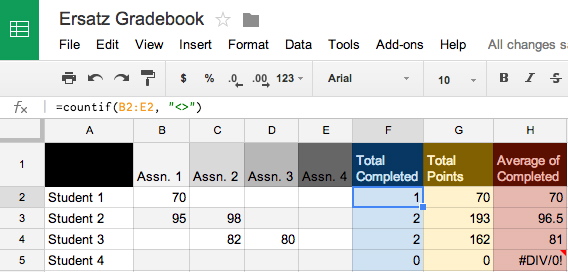
The figure above shows our sample spreadsheet. In Column F, as you can see, we're counting the number of assignments completed using this formula:
=countif(B2:E2, "<>")
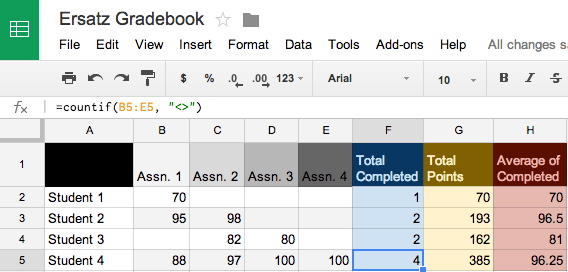
That simply creates a count of non-empty cells within a given range — in this case B2 to E2, in the next row down B3 to E3, in the one after that B4 to E4, etc. Those totals will automatically update any time a new score is added, as seen in the image below.
 sum example in google sheets

Time-saving tip: Once you insert the formula, you can select the cell, copy it, and paste to to a new row, an the cell range will automatically shift to the correct row. If instead you want to keep the original range, then double-click the cell and copy the text out of it, then paste it into a new cell.
The rest of it is very straightforward, but I'll explain it for those who might not be familiar with equations in spreadsheets.
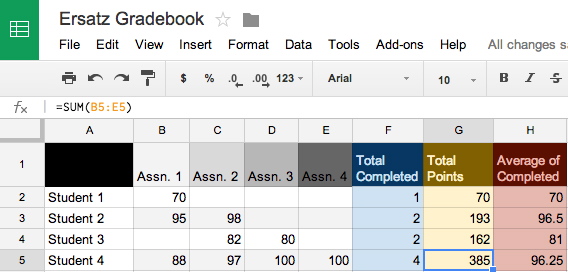
In column G, "Total Points," we're simply using the SUM function and specifying the range of cells whose values we want to add together. That is illustrated in the figure below.
 divide example in google sheets
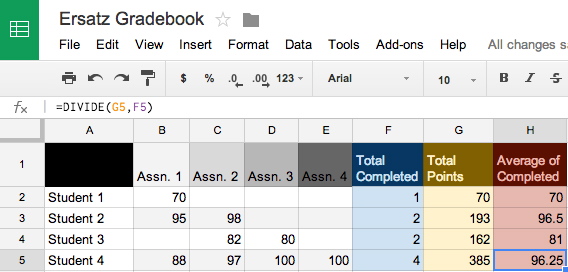
And then, finally, we're dividing the accumulated points (column G) by the total number of completed assignments (column F) in order to calculate a running average. This is done using the DIVIDE function, pictured below.
 item count example in google sheets
That's it! If you run into any trouble, ask me a question in the comments section below.